Create a New Page

Create a new website page

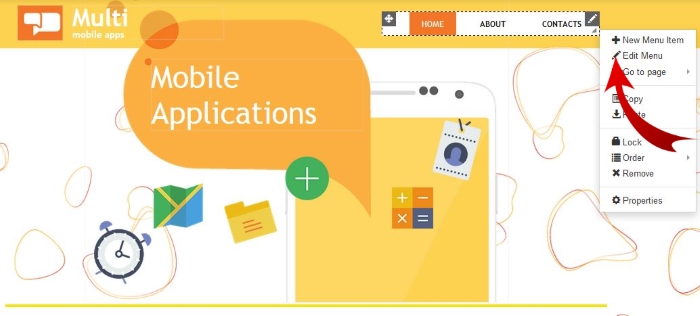
1. Right click on the navigation menu and select "Edit Menu"


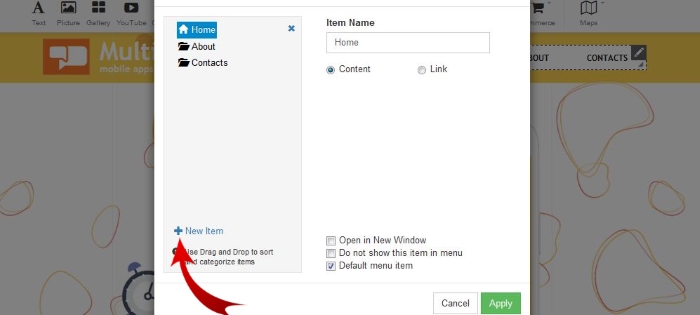
2. Click on “+New Item”


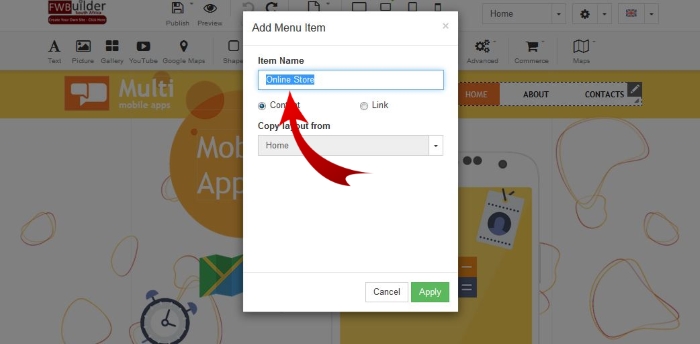
3. Rename the "Item Name" to your new page name and "Apply"


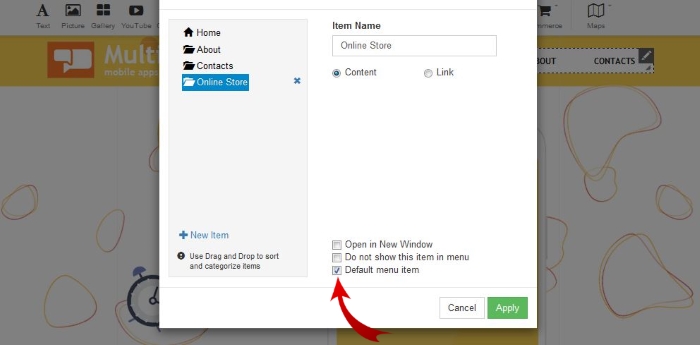
4. Select "Default Menu Item"


Great...That was super EASY.
P.S: If you don't want the new page in your Menu simply Un-tick the "Default menu" item. The page will be hidden from the menu. But you can still link to the page.


For more information view additional knowledgebase articles...

  • 6 Users Found This Useful
Was this answer helpful?

Related Articles

How to upgrade your account

How to upgrade you current package1. Login to your FWBuilder2. Click on Manage Websites3. Under...

How to add blocks to your website

ADD A BLOCK TO YOUR WEBSITELearn how to add a black to your website with our step by step...

How to add Facebook to your website

ADD FACEBOOK TO YOUR WEBSITEIn order to add a Facebook to your website, follow these easy...

How to add a Shopping Cart to your website

ADD A SHOPPING CARTIn order to add a shopping cart to your website, follow these easy steps:STEP...

How to add a gallery

Adding a Gallery: In order to add an image to your website you need to drag the image to your...