Add Skype to your website

ADD SKYPE

In order to add Skype to your website, follow these easy steps:


STEP 1:

Click on the "Advanced" button:


Adding skype to your website

STEP 2:

Select the "Skype I'm online" option in order to add skype to your page:
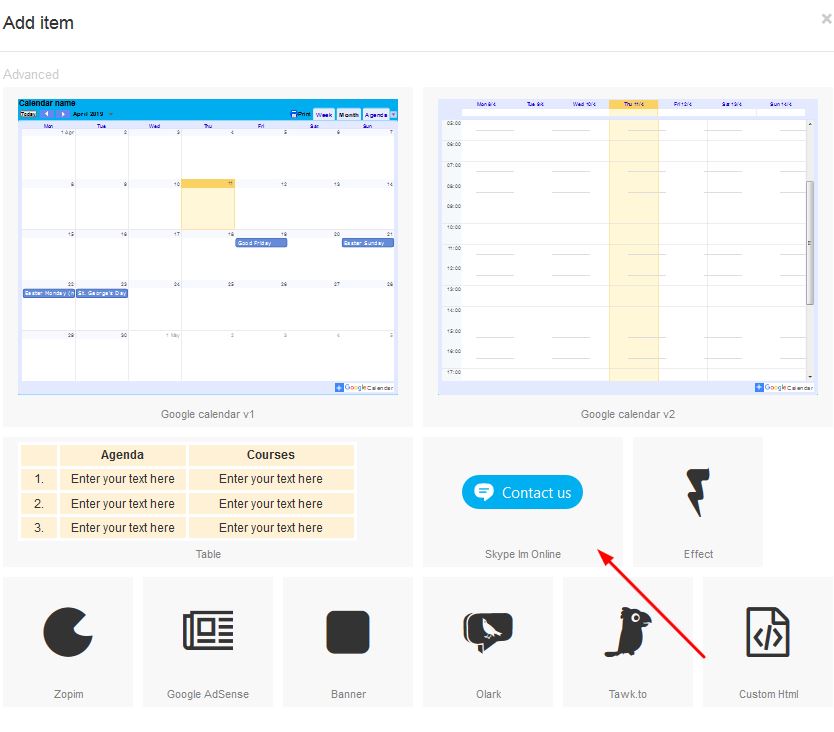
Adding skype to your website

STEP 3:

Right click in order to open properties:


Adding skype to your website


STEP 4:

Under the properties block, click on the general tab and add your skype details to this block and apply.
There are options to change font colours and skype colours which can be done so according to your colour requirements:
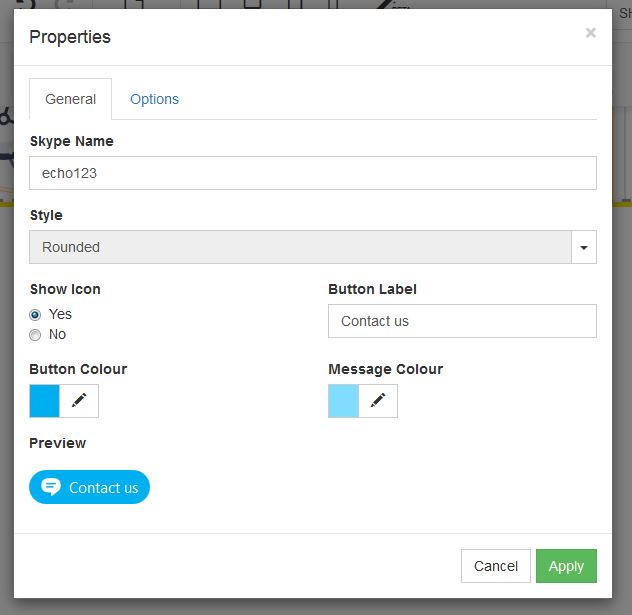

Adding skype to your website

  • 2 Users Found This Useful
Was this answer helpful?

Related Articles

Create a New Page

Create a new website page1. Right click on the navigation menu and select "Edit Menu"   2....

How to add Social Media to your website

ADD SOCIAL MEDIA TO YOUR WEBSITEIn order to add a social media to your website, follow these easy...

How to add a Favicon

HOW TO ADD A FAVICON A favicon is an icon associated with a particular website, typically...

How to add a gallery

Adding a Gallery: In order to add an image to your website you need to drag the image to your...

How to add Adsense to your website

ADD ADSENSE TO YOUR WEBSITEGoogle AdSense is a program run by Google that allows publishers in...